
Your IP is 38.107.191.100 IP United States, You should hide your IP address

Blog

How to setup HideIpVPN proxy to work with Firefox

In order to bring more value to our clients we provide proxy connections to our servers. This way, our premium users are able to browse anonymously in simple and easy way.

This post shows how to setup the HideIpVPN proxy to work with Firefox (all versions).  Here are the steps to follow:
  1. Open Firefox
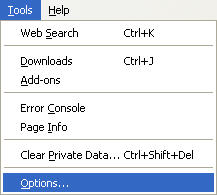
  2. Go to Tools -> Options…
    firefox-tools
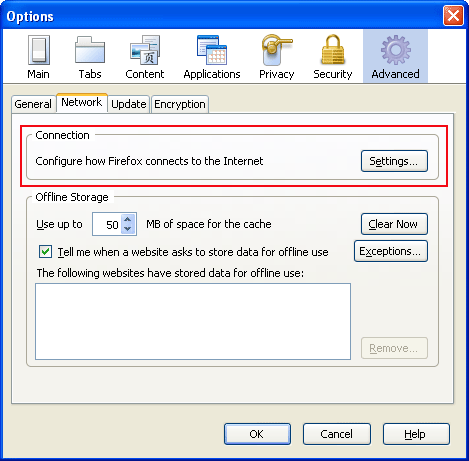
  3. Choose Network tab and press Settings button
    firefox30_config
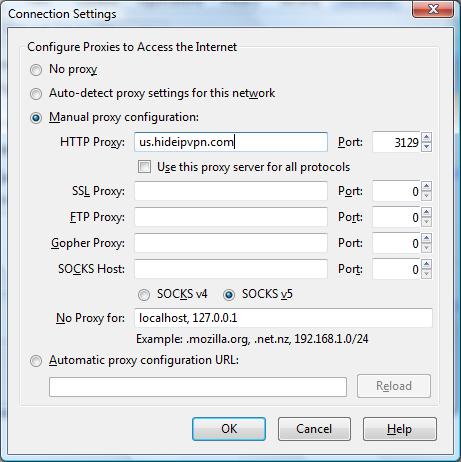
  4. In the Connection Settings window, check Manual proxy configuration:
    firefox_settings
  5. In the same window, fill in the HTTP Proxy and the Port (us.hideipvpn.com or uk.hideipvpn.com or use IP address instead of hostname and the port 3129 or 8080 or 81) (take a look to the previous picture).
  6. Press Ok and then Ok again and you are done.
  7. When you will try to access a site you will be promted for the username and password. Enter the same username and password you use to connect by VPN.

After the configuration is completed go to myiptest.com and check your new IP address. You can now browse anonymously using Firefox.

Important! Do not forget to change your Connection Settings from Manual proxy configuration to Direct connection to the internet, after you are done with your activites under hidden ip.

  1. Abbas,

    Thanks for this- one question: is it possible to setup the Proxy Server for use in Skype? Would highly appreciate a tutorial if this is possible.

    25 December, 2009 la 09:32
  2. desmond,

    thank for the tutorial, i will like to know how i will configure and get a users name and password. thanks and God bless for sharing this knowledge.

    11 February, 2010 la 00:46

Leave a Reply


Terms of Service  | Privacy PolicyFAQClient AreaContact USHideIpVPN.pl
LiveZilla Live Help