

In order to bring more value to our clients we provide proxy connections to our servers. This way, our premium users are able to browse anonymously in a simple and easy way.
This post shows how to setup the HideIpVPN proxy to work with Safari. Here are the steps to follow:
- Open Safari
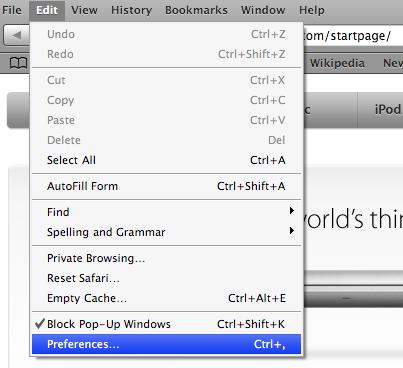
- Go to Edit -> Preferences:
- Choose Advanced tab and press Proxies : Change Settings button:
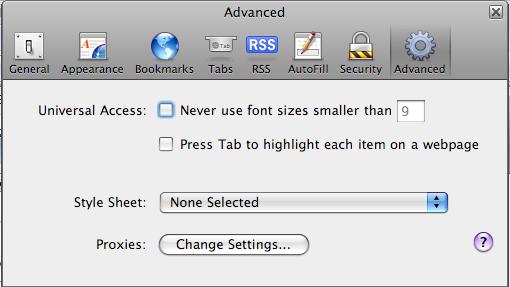
- In the Internet Options window press LAN Settings button:
- In the Local Area Network (LAN) Settings window, check Use a proxy server for your LAN:
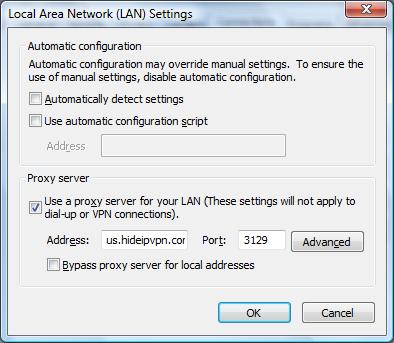
- In the same window fill in the Address of the server (or use IP address instead of hostname) and the Port (3129 or 8080 or 81). You have to check the email you have received when you have created the HideIpVPN account. You will find there the available servers.
- Press Ok and then Ok again and you are done.
- When you will try to access a site you will be promted for the username and password. Enter the same username and password you use to connect by VPN

Your Safari configuration is completed. In order to check it, go to MyIPTest.com and see your new IP address.
After you are done with your anonymous browsing activites, do not forget to uncheck Use a proxy server for your LAN. Use these settings only when you need to browse under hidden ip address!
